Sportium wanted to launch a whole new line of betting. It was the first “fantasy” game style active in spain so as a novelty it was needed to be developed quickly to anticipate to the competition. In addition it had to be a design that was adapted both to the versions online (desktop, tablet and mobile) and its machine version (te one to be placed physically in its shops). So the different designs underwent through different changes and adaptations according to their environment and characteristics (interaction style, keyboard on screen / physical / native, etc.)
.
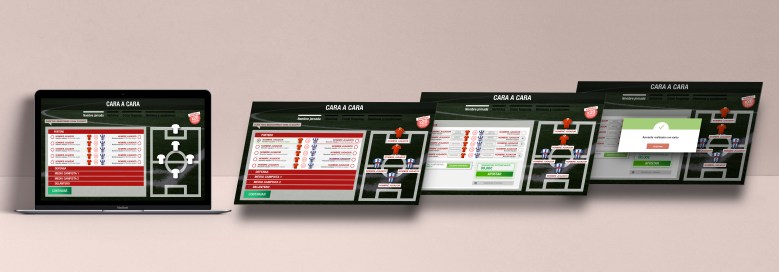
The operation of Sportium’s Fantasy is divided into three steps or sections: A main screen where to select each of your bets to play (players in each position) another screen to review your selections and indicate how much to bet in which one, and finally a final screen where to consult the results and statistics of the last days.
In both the desktop and the physical machine versions, the menu is located in the header, showing all its components visible closely to user’s vision. In mobile version, the menu is compressed to the left of the upper zone.
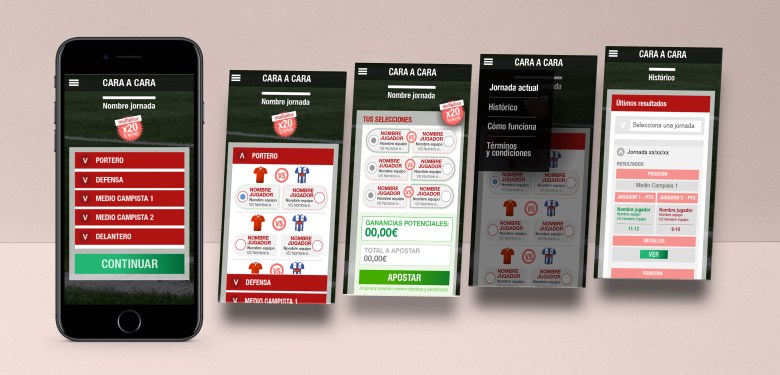
In desktop and physical machine versions the selection of players for the user to make his bet can be executed in two ways; by clicking directly on the position from which you want to select a player on the position map of the football field, or by clicking directly on the list of positions to the left of it. Once the bet is selected, the white shirts become the selected team color through an animation.
The user will see the “continue” button disabled (in a gray desaturated color) until he has made all the selections. Once they are all are done, the button will be automatically activated so that the user can proceed to select the amount that he wants to bet.
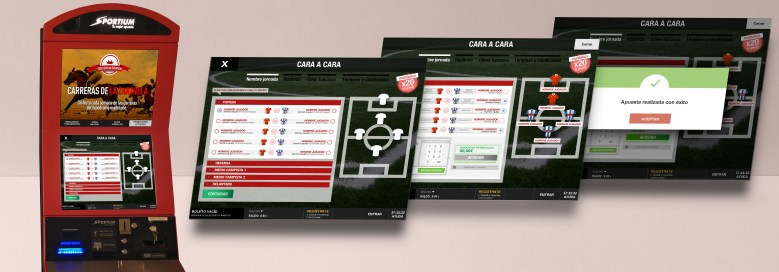
In the selection screen of the desired amount to bet, the user can review and edit their selections (to avoid having to change the screen again and again if you rethink). To finalize the bet the user must enter an amount of money accepted for betting, then the “bet” button will be activated to end the bet.
If the user wishes to consult the results of his bets, he should only go to the “historical” section and there he will be able to consult all the data and statistics on the results of the day.
 Sara's portfolio